
Security and Privacy
Where your data lives, what leaves your machine, and how secrets are protected
Yaak is a local-first desktop app that treats API requests and responses as sensitive. As a result, Yaak is often chosen over cloud-based alternatives for security and privacy reasons. This page covers the desktop app. The web app sends requests through a proxy; see How the Web Proxy Works for what it can see, encryption in transit, and logging.
In short, for the desktop app:
- All data stored locally, no account required
- Optional secret encryption, with keys protected by the OS keychain
- No built-in AI
- MIT-licensed open source
Where your data lives
Yaak stores requests, environments, response history, and settings on your device in a local SQLite database. There is no cloud component, and no account is required to use the app.
Directory sync can also be enabled to sync workspace data to plain text files for use with Yaak’s built-in Git functionality, or file-sync services like Dropbox.
When data leaves your machine
Desktop API requests go to the servers you choose, without a Yaak-hosted relay. System or custom proxies are used when configured. Yaak also makes a small number of network requests to Yaak’s servers:
- Checking for app updates (can disable)
- Checking for notifications (can disable)
- Checking for updates to plugins installed from the plugin directory
- Fetching the plugin directory when you browse or install plugins
- Activating and checking a license key, if one is in use
- Sending in-app feedback, only when you submit it
These requests carry operational metadata such as the app version, operating system, and license status. They don’t include your requests, responses, or environment values. Each check sends:
- Update checks (can be disabled): app version, operating system, CPU architecture, update channel, install method, whether the check was started manually, and a hashed installation identifier used to stage releases.
- Notification checks (can be disabled): current and previous app version, number of launches, date of first launch, license status, whether automatic updates are enabled, and operating system.
- Plugin update checks: names and versions of plugins installed from the plugin directory.
- License activation and checks (only when a license is activated): license key at activation, activation identifier, app version, and operating system.
- In-app feedback (only when submitted): the feedback text, app version, and operating system.
These requests also include standard network information such as IP address and user agent.
When an OAuth 2.0 flow uses your external browser with the
Hosted Redirect callback (the default for that option), the browser passes the
provider’s authorization response through a page on oauth.yaak.app back to the app.
Choose the Localhost callback to avoid this.
The CLI also checks for new versions. Set
YAAK_CLI_NO_UPDATE_CHECK=1 to turn this off.
There are no analytics, no tracking, and no crash or error reporting in the app.
Secrets encryption
Yaak also offers the ability to encrypt specific values in the app on a per-workspace basis using the secure(...) template function.
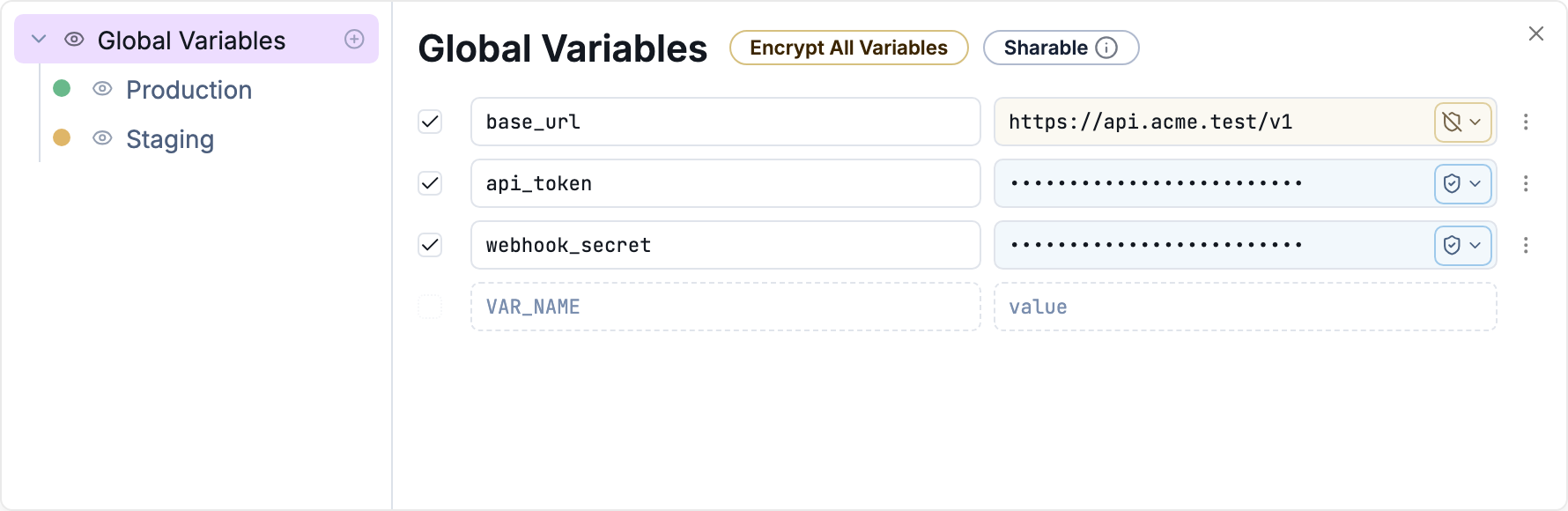
Encrypted values stay obscured in the UI
These values are encrypted with XChaCha20-Poly1305 using a workspace key. A master key in the OS keychain protects the workspace key, which is stored encrypted in Yaak’s local database. The encrypted values are stored with your workspace data, not in the keychain.
Fields known to contain sensitive data (authorization headers, passwords, environment values) are encrypted by default once encryption is enabled. This protects selected values, not the entire database or response history. Encrypted values can also be shared through directory sync; recipients need the workspace key to decrypt them.
See Secrets Encryption for setup and details.
AI and agents
Yaak ships without built-in AI. No AI features run in the app and no request data is sent to AI providers.
Connecting AI is your choice, made externally: the CLI lets terminal agents like Claude Code create and send requests, and the MCP Server plugin exposes workspaces to any MCP-compatible assistant. Neither is active unless you set it up.
Open source
Yaak is MIT-licensed. The source can be audited, modified, and built from scratch.
Compliance notes
Yaak does not store or sync your workspace data, and the desktop app does not send your requests, responses, or environments to Yaak’s servers. The network requests listed above carry only operational metadata. For HIPAA specifically, Yaak does not process PHI on behalf of users and therefore does not meet the definition of a Business Associate, so BAAs are not signed.
Questions? Email help@yaak.app.
Was this helpful?