
Server-Sent Events
Stream real-time events from SSE endpoints
Yaak supports Server-Sent Events (SSE), displaying events as they stream from the server.
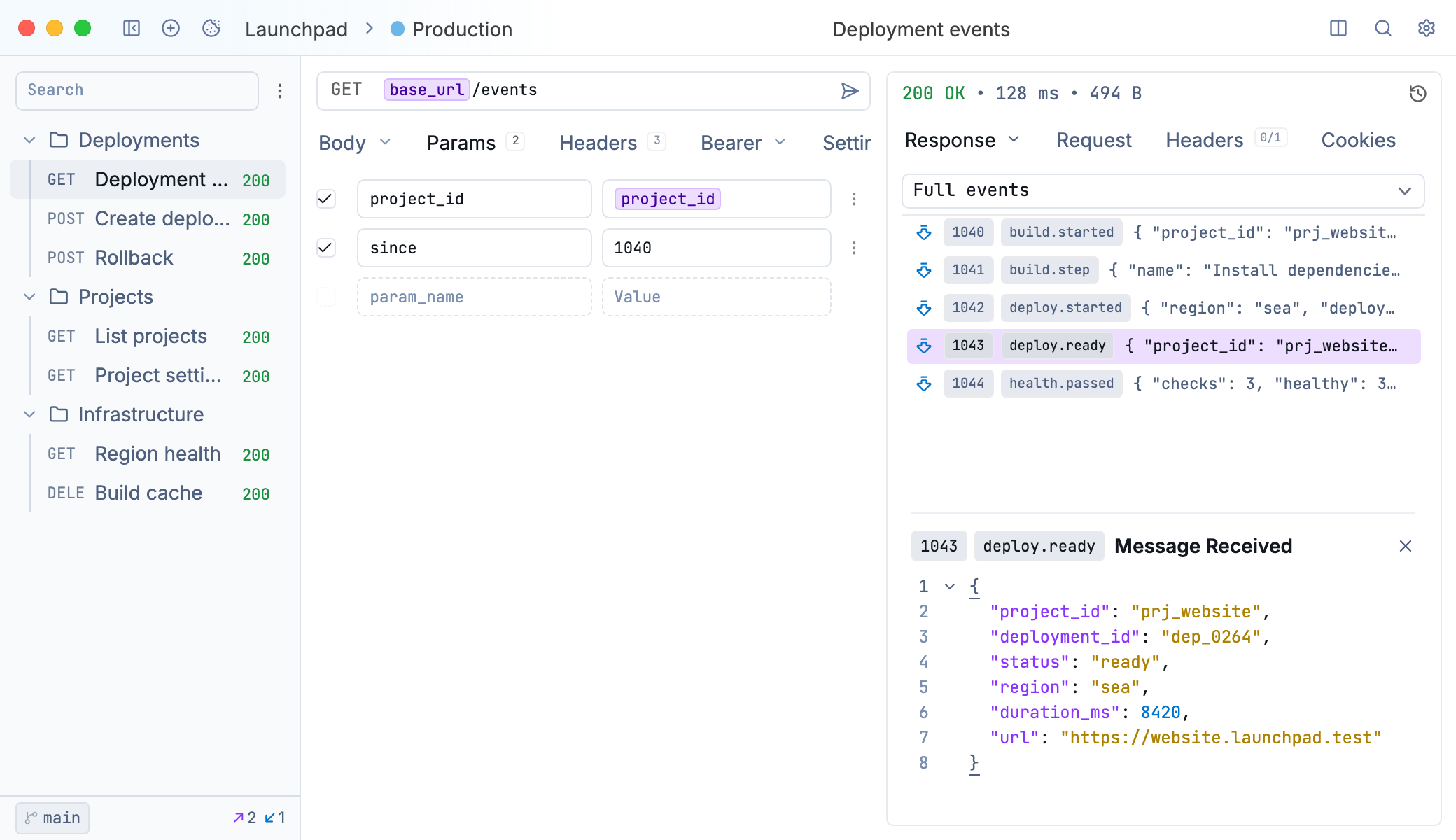
Server-sent events streaming into the response pane
Sending an SSE Request
SSE uses standard HTTP requests. Create an HTTP request pointing to your SSE endpoint—Yaak detects the text/event-stream content type and displays events as they arrive.
- Create a new HTTP request
- Enter your SSE endpoint URL
- Click Send
Events appear in the response pane as the server sends them. The connection stays open until the server closes it or you cancel the request.
Streaming Response Behavior
When connected to an SSE endpoint:
- Request shows Connecting until headers are received
- Status code appears when headers arrive
- Size and Time update as each event is received
- Events render as they stream in
This streaming behavior applies to all response types—any response that sends data in chunks shows progressive updates.
Event Display
Events follow the SSE protocol format:
- data - The event payload
- event - Event type name (optional)
- id - Event identifier for resumption (optional)
Each event displays with an index for tracking order in long-running connections.
Was this helpful?