Yaak is a local-first API client that focuses on security, ease of use, and collaboration (using Git). Thousands of developers trust Yaak every day to interact with APIs securely, without syncing their workspaces to a cloud service.
If you’re evaluating Yaak for your company or team, this page covers everything you need to know about how it fits into professional environments—from pricing to privacy and compliance.
| Summary | |
|---|---|
| Price | See pricing |
| License model | Annual per-user subscription or one-time Individual lifetime license |
| Storage | 100% local. No cloud accounts or data sync |
| Codebase | Fully open source on GitHub |
| Platforms | macOS, Windows, Linux |
| Support | Private email support |
Unlike other API clients, Yaak works offline, stores data locally, includes no telemetry or 3rd-party tracking libraries, and is 100% open source, making it easy to reason about security and compliance.
Yaak can optionally sync requests and environments to a folder on your local machine, which enables collaboration via its built-in Git integration.
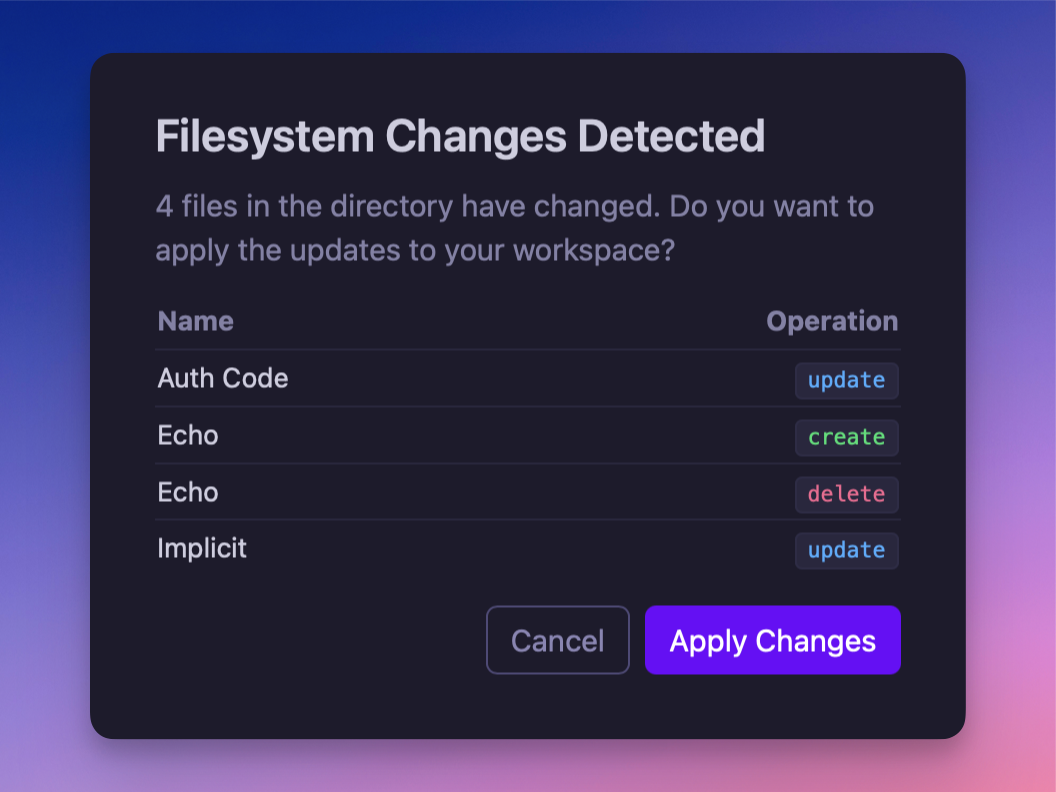
Modified/deleted filesystem changes will show a confirmation
Yaak can encrypt sensitive values before they are saved or synced. The OS keychain protects the encryption keys; encrypted values stay with your workspace data. Share the workspace key separately with teammates who need to decrypt them. See Secrets Encryption for setup.
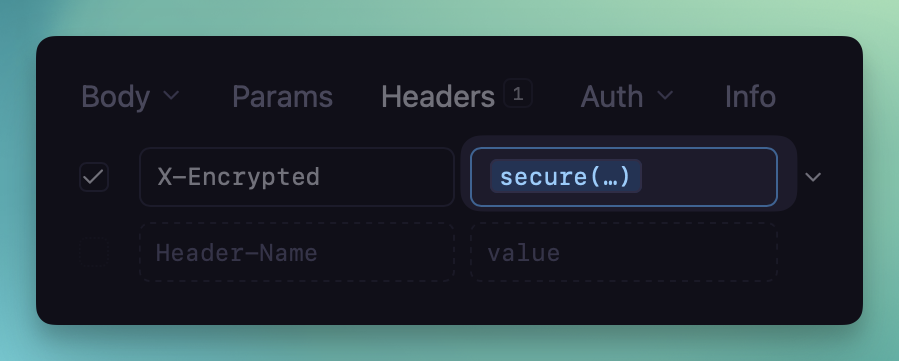
Using the secure(...) function within a header value
Yaak is a desktop application with no servers, agents, or background daemons required.
Yaak’s core API workflows work offline. Activating and validating a paid license
requires access to license.yaak.app.
Team administrators can manage seats and billing from the Yaak dashboard.
Yaak’s security model is intentionally simple:
| Feature | Postman | Insomnia | Yaak |
|---|---|---|---|
| Local-first | ❌ | ⚪️ Partial | ✅ |
| Git integration | ✅ | ✅ | ✅ |
| Cloud sync | ✅ | ✅ | ❌ |
| Encrypted secrets | ⚪️ Partial | ⚪️ Partial | ✅ |
| Open source | ❌ | ⚪️ Core only | ✅ |
| Offline mode | ⚪️ Limited | ⚪️ Limited | ✅ |
Can we use Yaak for free?
A license is required to use Yaak for commercial use (for work or revenue-generating activities).
Is there a trial period?
A 30-day free trial is available, and is automatically activated by downloading and
launching the app. Please reach out to sales@yaak.app if you need more time.
Is Yaak GDPR or SOC2 compliant?
Yaak doesn’t store or sync workspace data in the cloud, and the desktop app doesn’t send
requests, responses, or environment values to Yaak’s servers. The operational metadata it
does send is described in the Privacy Policy, so you can review it against your
own requirements.
Can we self-host it?
No hosting is required. Yaak runs on your local machine.
Can we pay by invoice or purchase order?
Please email sales@yaak.app to discuss purchasing options.
What happens if we stop paying?
Annual subscriptions include a
lifetime fallback license: you can keep
using the last version released during your paid term for commercial work, without updates
or support. The one-time Individual lifetime license includes future updates.
Yaak is trusted by thousands of developers worldwide.
It’s local, transparent, and backed by a simple license — no vendor lock-in, no surprise
bills.
📧 Contact: sales@yaak.app
🌐 Learn more: yaak.app/pricing
Yaak earns about $5k MRR from commercial licenses for its binaries. Why I chose this model, how it's working, and the tradeoffs of keeping the entire app open source.
Postman removed free team collaboration in March 2026, and legacy plans convert to the new pricing at renewal. What that costs, what your options are, and how to move your collections.
A year ago I had just launched Yaak’s commercial-use license and was sitting at $160 MRR. It was a gamble to choose a…