
ERROR: Multiple base environments for wk_(...). Delete duplicates before continuing.

BugQuestion
Featured answer
Jump to comment·Gregory Schier
The delete option wasn’t showing up correctly in the right-click menu for base environments. I’ve fixed it now in https://yaak.app/changelog/2026.2.2
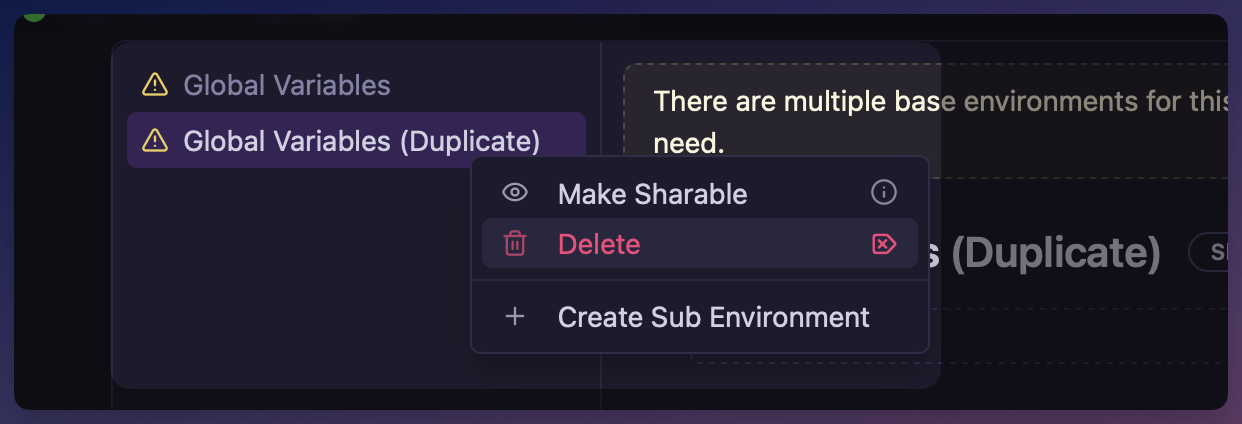
Just got this error message, but I cannot find any button or functio in the GUI to actually delete the duplicate base environment, and I can’t see any duplicates in the files either. Please advice how to clean this up.
I also made two sub environments for testing, but there is no way to remove them again in the GUI as far as I ca tell.
macOS2026.2.1
The delete option wasn’t showing up correctly in the right-click menu for base environments. I’ve fixed it now in https://yaak.app/changelog/2026.2.2
Great! Can confirm that I was able do delete the duplicate base env and the sub envs now. Cheers!
Do you get a delete option when you right-click on the environment?
Nope, no context menu when right clicking either env or sub env. I’m on macOS Tahoe 26.3 btw. It’s also quite strange, because when I open the same workspace/folder on Yaak on Fedora 43, I get no errors. Also the sub envs are not listed there.
That’s strange. You should see a context menu on a right-click. Are you in the environment dialog and not the dropdown?
When right-clicking in a element, I get this menu: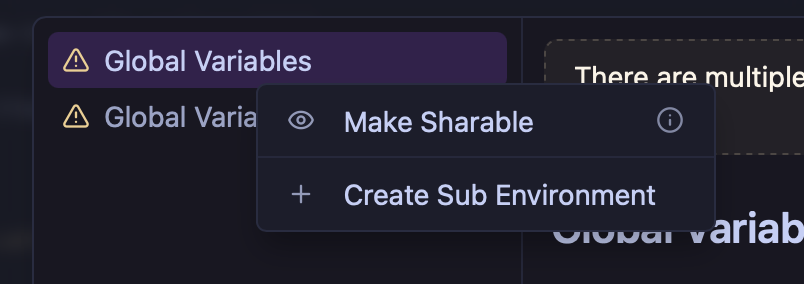
I can double-click the environment and rename it…
But the defined global variable I have is only displayed in the right pane, not below the “Global Variables” in the left pane / list.
Note, the sub environments (also applies to base environment) will need to be marked as “sharable” in order to show up in sync or export data.