
Cannot uninstall plugin if missing?


I’m pretty sure I fixed this but forgot to mark it off (cannot reproduce). Please let me know if this is still an issue (with reproduction steps) and I’ll get it fixed.
A follow-up to this issue: I’m now able to start the application and I see the toast warning that the plugin could not be found.
This plugin was the only one I’d installed, and when I go to the Plugins Manager, it shows Installed (1), but the list renders empty.
Thinking about UX, I’d expect to see the plugin in the list but greyed out with a ! warning, and still having the option to uninstall it.
As it stands now, direct SQLite manipulation (per your recommendation) seems to be the only thing that could address this.
This isn’t a blocker so I’m not sure if you’d consider it a bug or a mere improvement. However, I figure that this is unintended behavior, so I’ve marked it as both.
I’m pretty sure I fixed this but forgot to mark it off (cannot reproduce). Please let me know if this is still an issue (with reproduction steps) and I’ll get it fixed.
I’m still having this problem on 2026.4 :( I got 2 “ghost plugins”. The first error occurred when I pointed (using the file chooser in Yaak’s Plugins tab) to the plugin’s root directory path, which was missing a build generated by the yaak cli.I then received the following message: “Plugin error. No plugin events returned for. @trading-api/plugin_1”
The second time I tried importing plugin, I accidentally selected the “main-project” folder, which also triggered a “plugin not found” error. After generating the build and installing plugin via the terminal: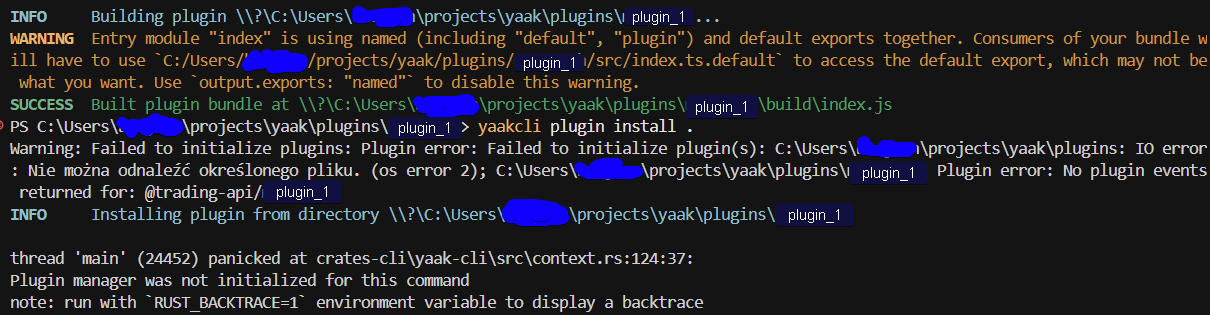
Looking at db.sqlite, those paths were imported for sure. And the strange thing is that my plugins have backslashes in their paths, while the bundled plugins use regular slashes…
once they’re cleared from the DB, the installed plugins tab is fine again, but being able to delete them directly in Yaak would be great :)
Ah, thanks for following up here! I’ll fix that.
Just seconding this. I’m getting a similar error where I have a phantom plugin I can’t see in the UI, which is causing a load failure toast on startup. At the top of the plugins list, it says Installed(2), but there is only one plugin actually showing.
I agree with the suggested UX above for uninstalling a plugin that didn’t load right.
Alternate workaround (without editing the SQL manually): I looked in the log to figure out what plugin it was missing. I put a valid plugin where it was looking for the missing one. Yaak loaded without error and then I was able to uninstall the phantom one cleanly.