
Yaak Logo
Yaak
Feedback/NTLM authentication fails with Plugin error

NTLM authentication fails with Plugin error

Matthias ·9 days ago
Released to BetaBug

I’m trying to connect to an internal application that uses NTLM authentication. I know the endpoint works as the configuration works fine through postman (using NTLM authentication).

Using Yaak, i get the following error (both on windows, and when starting yaak through WSL)
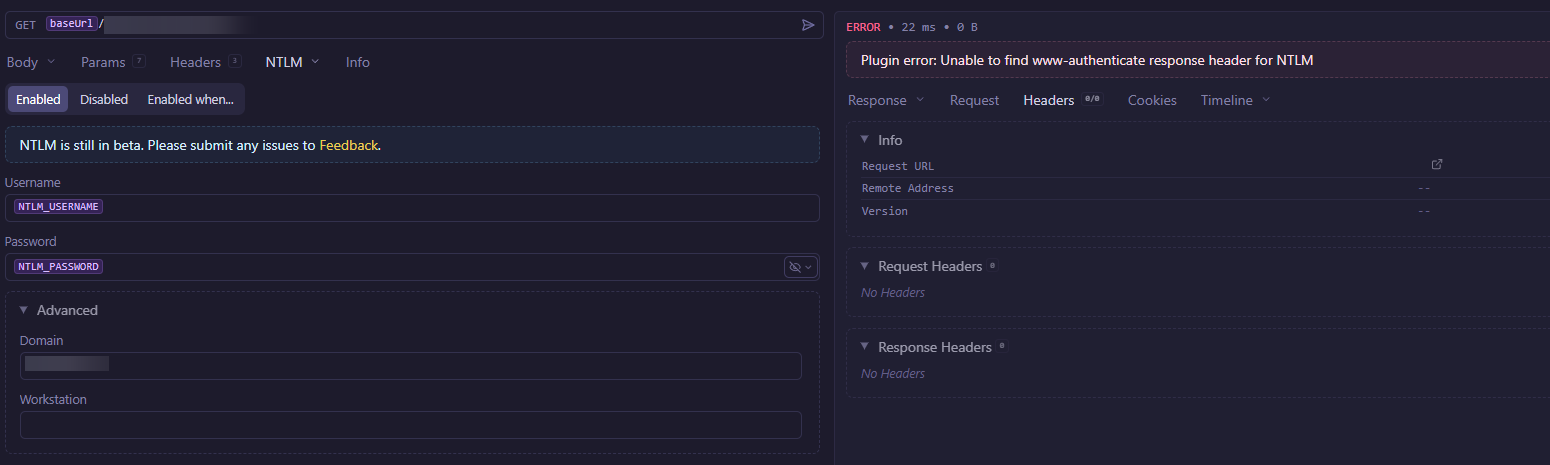
image

The following pictures shows the configuration used for postman: image
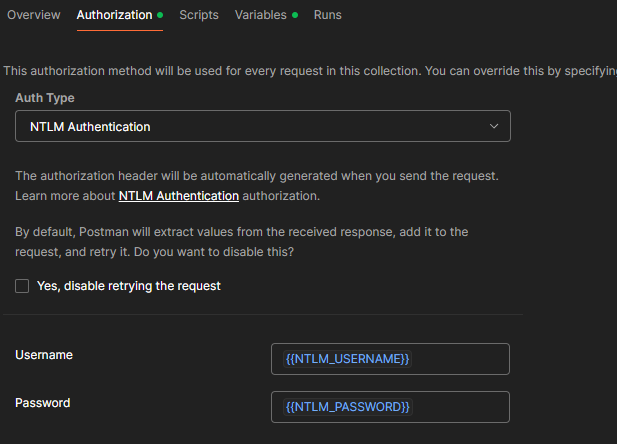
I’ve also tried using CURL for this request - where i can see that the www-authenticate header is included in the response (if i send no auth, obviously).

Is there anything else i can do to assist in finding the cause for this?

edit aside from this - awesome API client!

Windows2026.2.1

Comments (12)

Sign in to leave a comment.

Gregory SchierReleased to Beta
Matthias OP

Unfortunately, i seem to still encounter this with 2026.3.0-beta.5

The error now changed slightly (which is obvious given the changes made) - but it’s still not actually authenticating (based on the code, it’s not getting to a point where credential correctnes is relevant just yet).

with 2026.3.0-beta.5: image

Matthias OP

Is there any way for me to get more detailed logs somehow?

Based on the code (and some tests with webhook.site) - it seems like the initial request already contains a “authorization: NTLM ”.

https://github.com/mountain-loop/yaak/blob/1e7e1232dac2748aba10df5ee8f574151d8451ae/plugins/auth-ntlm/src/index.ts#L70

image

If i compare this with postman (same ntlm config) - it’s not attaching the token in the initial request (querying this against the API in question WOULD result in a www-authenticate" header).

image

Now i’m not 100% familiar with details of the ntlm protocol - but it seems like Yaak is sending the authentication initially - so (assuming it’s a correct hash?) - would we still expect a “www-authenticate” to be in the response (I don’t think so but I’m not sure)?

Gregory Schier

Okay after some digging into how Curl handles it, I found there are two different strategies that can be used.

Curl’s default is what Yaak does now (sends the Authorization: NTLM ... header immediately)

curl --ntlm -u 'DOMAIN\\username:password' https://yaak.app/x/echo-full

The second method is enabling the --negotiate flag, which will change the behavior to what Postman does (send regular request and expect a WWW-Authenticate challenge header).

curl --ntlm --negotiate -u 'DOMAIN\\username:password' https://yaak.app/x/echo-full

It seems like the plain --ntlm is supposed to work. Can you let me know the WWW-Authenticate header formats returned by executing each of those on your server? Apparently some servers can also respond with WWW-Authenticate: Negotiate ... as opposed to WWW-Authenticate: NTLM ... which Yaak currently matches on.

Matthias OP

Thanks a lot for looking at this further!

using curl --ntlm --negotiate <...> - i can’t get this endpoint to work (like - not at all). The returned headers are both Negotiate and NTLM - but Negotiate doesn’t work as i’m on linux and don’t have a kerberos ticket for that user available.

< www-authenticate: Negotiate
< www-authenticate: NTLM
[...]

* gss_init_sec_context() failed: No credentials were supplied, or the credentials were unavailable or inaccessible. SPNEGO cannot find mechanisms to negotiate.
< www-authenticate: Negotiate
< www-authenticate: NTLM

Without negotiate:

> GET /endpoint/some HTTP/1.1
> Host: server.domain:8002
> Authorization: NTLM TlRMTVNxxxxxxAAAAAAAAAAAAAAAAAAA=
> User-Agent: curl/8.5.0
> Accept: */*
>
* TLSv1.3 (IN), TLS handshake, Newsession Ticket (4):
< HTTP/1.1 401 Unauthorized
< Content-Type: text/html; charset=us-ascii
< Server: Microsoft-HTTPAPI/2.0
< WWW-Authenticate: NTLM TlRMTVNTUAACAAAACwALADgAAAAGgokCyusU9wzFYAIAAAAAAAAAAMYAxgBDAAAACgB8TwAAAA9SV...                           
< Date: Fri, 27 Feb 2026 08:42:36 GMT                                                                 
< Content-Length: 341                                                                                 
<                                                  
* Ignoring the response-body                                                                          
* Connection #0 to host amssvc001.rubnergroup.local left intact
* Issue another request to this URL: 'https://server.domain:8002/endpoint/some'
* Found bundle for host: 0x5a377a6bac60 [serially]
* Re-using existing connection with host amssvc001.rubnergroup.local
* Server auth using NTLM with user 'rubnergroup\amsservice'
> GET /endpoint/some HTTP/1.1
> Host: amssvc001.rubnergroup.local:8002
> Authorization: NTLM TlRMTVNTUAADAAAAGAAYAEAAAAD2APYAWAAAAAsACwBOAQAACgAKAFkBAAALAAsAYwEAAAAAAAAAAAAA
BoKJAqoVnIFPZ3x0jzrKOowKYlQZUO59mK5wGEsAMnzxLoGP1a6rV/QVFX0BAQAAAAAAAACmrgXFp9wBGVDufZiucBgAAAAAAgAWAF...
> User-Agent: curl/8.5.0
> Accept: */*
>
< HTTP/1.1 200 OK
< Transfer-Encoding: chunked
< Content-Type: application/json; odata.metadata=minimal; odata.streaming=true; charset=utf-8
< Content-Language: de-DE
< Server: Kestrel
< Set-Cookie: SessionId=371cbe14-2861-4eee-925b-cf150e5f12fe; path=/
< Strict-Transport-Security: max-age=2592000
< OData-Version: 4.0
< Persistent-Auth: true
< X-Powered-By: ASP.NET
< Date: Fri, 27 Feb 2026 08:42:36 GMT
<
* Connection #0 to host server.domain left intact

now to be fair (and i’m not sure if this isn’t somehow related) - i did append --http1.1 to this call. without it - there’s an additional initial request where curl downgrades with the following “comment”:

* HTTP/2 stream 1 was not closed cleanly: HTTP_1_1_REQUIRED (err 13)
* Downgrades to HTTP/1.1
Empty reply from server
* Connection #0 to host server.domain left intact
* Issue another request to this URL: 'https://server.domain:8002/endpoint/some'

there’s essentially no repsonse (also no response header) in this initial request other than “handshake failed”.

Apparently the server can’t properly do http2 (yaak works without authentication - but probably becaues i get a plain 401 without further “discussion”?) Maybe there’s a way / setting to temporarily disable attempting http2 (which would replicate hte --http1.1 flag i pass to curl?

Gregory SchierNeeds Reproduction

Are there any redirects in the response chain for this? If so, do you have redirects disabled in Yaak’s settings?

Any chance you have a public endpoint or project that I can run, to reproduce this with?

Matthias OP

I just tried with and without redirects disabled - but it didn’t change behavior.

Unfortunately, it’s a private endpoint (from an ERP system, no less) which we can’t expose.

I’ve tried a curl request for this with -v

curl -X GET 'https://server001.company.local:8002/some/route' \
  --header 'User-Agent: yaak' \
  --header 'Accept: application/json' \
  -v

and got the following response. as far as i can tell, there’s no redirect or similar involved.

I do clearly receive 2 www-authenticate response headers - so i don’t really get or grasp what the error in yaak is trying to tell me.

Note: Unnecessary use of -X or --request, GET is already inferred.
* Host server001.company.local:8002 was resolved.
* IPv6: (none)
* IPv4: 10.0.247.33
*   Trying 10.0.247.33:8002...
* Connected to server001.company.local (10.0.247.33) port 8002
* ALPN: curl offers h2,http/1.1
* TLSv1.3 (OUT), TLS handshake, Client hello (1):
*  CAfile: /etc/ssl/certs/ca-certificates.crt
*  CApath: /etc/ssl/certs
* TLSv1.3 (IN), TLS handshake, Server hello (2):
* TLSv1.3 (IN), TLS handshake, Encrypted Extensions (8):
* TLSv1.3 (IN), TLS handshake, Certificate (11):
* TLSv1.3 (IN), TLS handshake, CERT verify (15):
* TLSv1.3 (IN), TLS handshake, Finished (20):
* TLSv1.3 (OUT), TLS change cipher, Change cipher spec (1):
* TLSv1.3 (OUT), TLS handshake, Finished (20):
* SSL connection using TLSv1.3 / TLS_AES_256_GCM_SHA384 / X25519 / RSASSA-PSS
* ALPN: server accepted h2
* Server certificate:
*  subject: C=IT; ST=ST; L=Location; O=company; OU=IT; CN=server001.company.local
*  start date: Jul 31 11:45:31 2025 GMT
*  expire date: Jul 30 11:45:31 2030 GMT
*  subjectAltName: host "server001.company.local" matched cert's "server001.company.local"
*  issuer: DC=local; DC=company; CN=company-CA
*  SSL certificate verify ok.
*   Certificate level 0: Public key type RSA (2048/112 Bits/secBits), signed using sha256WithRSAEncryption
*   Certificate level 1: Public key type RSA (2048/112 Bits/secBits), signed using sha256WithRSAEncryption
* using HTTP/2
* [HTTP/2] [1] OPENED stream for https://server001.company.local:8002/some/route
* [HTTP/2] [1] [:method: GET]
* [HTTP/2] [1] [:scheme: https]
* [HTTP/2] [1] [:authority: server001.company.local:8002]
* [HTTP/2] [1] [:path: /some/route]
* [HTTP/2] [1] [user-agent: yaak]
* [HTTP/2] [1] [accept: application/json]
> GET /some/route HTTP/2
> Host: server001.company.local:8002
> User-Agent: yaak
> Accept: application/json
>
* TLSv1.3 (IN), TLS handshake, Newsession Ticket (4):
< HTTP/2 401
< cache-control: no-cache, no-store, must-revalidate
< pragma: no-cache
< content-length: 142
< content-type: application/problem+json; charset=utf-8
< expires: 0
< server: Kestrel
< strict-transport-security: max-age=2592000
< www-authenticate: Negotiate
< www-authenticate: NTLM
< x-powered-by: ASP.NET
< date: Fri, 20 Feb 2026 07:32:16 GMT
<
* Connection #0 to host server001.company.local left intact
{"type":"https://httpstatuses.io/401","title":"Unauthorized","status":401,"traceId":"00-34384660a863959590f153e52c1f08c4-0c64e6d2290979a6-00"}
Gregory Schier

Thanks for the help! Yaak wasn’t properly handling the multiple www-authenticate headers. Just closed a PR to fix that https://github.com/mountain-loop/yaak/pull/402

SoftExpert

I just tested with 2026.3.0-beta5 on Windows 2025 with IIS - it still does not work and there are no recorded traces, as we can see in the following screenshot:

image

In order to facilitate analysis - is it possible to collect a detailed trace of everything exchanged between Yaak and the web server ?

Gregory Schier

You can use something like Proxyman for that

SoftExpert

I got better results with Fiddler; here is the only request/response sequence that is recorded so far; I hope it can help …

image
Gregory Schier

Hmm, that’s an odd one. Curl doesn’t sent content-length either though.

image
Type to search feedback...